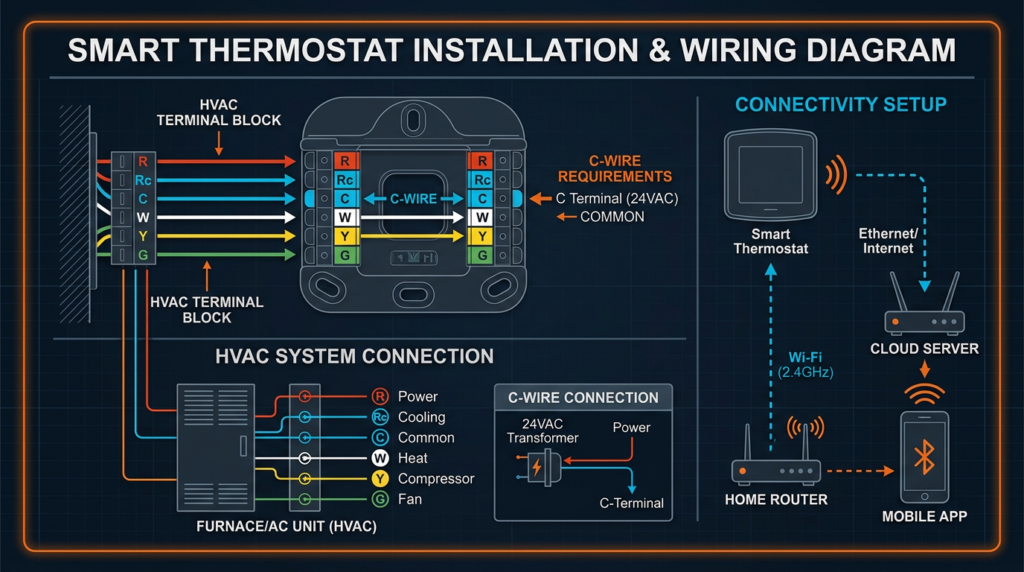
What Is a Smart Thermostat?
A smart thermostat is a Wi-Fi-connected digital thermostat that enables remote temperature control, automated scheduling, and energy usage analysis through a smartphone app or web interface. Unlike traditional programmable thermostats, which require manual schedule entry, smart thermostats use occupancy sensors, learning algorithms, and geofencing to optimize heating and cooling with minimal user input. The result is a device that can reduce annual heating and cooling costs by 10 to 15 percent while improving household comfort. Smart thermostats represent one of the most accessible upgrades homeowners can make to improve HVAC efficiency, and for technicians, they are an increasingly standard component of modern system installations.
Types of Smart Thermostats
Learning Thermostats
Learning thermostats use built-in algorithms to observe user behavior over time and automatically generate heating and cooling schedules. The Google Nest Learning Thermostat is the most well-known example. These devices track when occupants adjust the temperature, when they leave the house, and how quickly the home heats or cools. Within one to two weeks, the thermostat builds a schedule that reflects actual habits. Learning thermostats are best suited for households with relatively consistent daily routines.
Programmable Smart Thermostats
These thermostats offer user-defined scheduling combined with smart features such as geofencing, remote access, and energy reporting. Models like the ecobee Smart Thermostat Premium and the Honeywell Home T9 fall into this category. They do not automatically learn schedules but provide robust tools for manual optimization. This type works well for users who prefer direct control over their HVAC schedule.
Non-Programmable Smart Thermostats
At the simplest end, non-programmable smart thermostats provide Wi-Fi connectivity and remote control without preset scheduling. They are typically less expensive (around $100) and serve well in applications like supplemental heating systems, rental properties, or situations where a single setpoint is preferred.
HVAC System Compatibility
Before purchasing a smart thermostat, verifying compatibility with the existing HVAC system is essential. Most smart thermostats support the following system types:
- Gas, oil, and electric furnaces (single-stage and multi-stage)
- Central air conditioning (single-stage and two-stage)
- Heat pumps (air-source and geothermal, with auxiliary heat)
- Boilers (hot water and steam, though steam systems often require specific models)
- Zoned systems (with compatible zone controllers and dampers)
Multi-stage and heat pump systems require thermostats with the correct number of relay outputs or terminal connections. A single-stage furnace uses basic W (heat) and Y (cool) terminals, while a two-stage heat pump may require W1, W2, Y1, Y2, O/B (reversing valve), and AUX terminals. Always cross-reference the thermostat’s compatibility checker, available on most manufacturer websites, with the specific HVAC equipment model number.
Systems using the OpenTherm protocol benefit from thermostats that support this standard. OpenTherm enables continuous modulation of boiler output rather than simple on/off cycling, improving efficiency and comfort. OpenTherm-compatible thermostats are more common in European markets but are gaining traction in North America.
Smart thermostats also work with newer HVAC equipment designed around alternative refrigerants such as R-32 and R-454B, which are replacing R-410A. While the thermostat does not interact with the refrigerant directly, its ability to manage staging, defrost cycles, and auxiliary heat is critical for maximizing the performance of modern heat pumps using these refrigerants.
Installation
DIY vs. Professional Installation
Many smart thermostats are designed for homeowner installation. Manufacturers include step-by-step guides, wiring labels, and compatibility checkers. However, professional installation is recommended in the following situations:
- The existing system lacks a C-wire (common wire) and no adapter is available
- The HVAC system is multi-zone with complex wiring
- The home has a high-voltage system (e.g., 120V or 240V baseboard heaters) that requires a line-voltage thermostat rather than a low-voltage smart thermostat
- The homeowner is unfamiliar with low-voltage electrical work
- Warranty requirements mandate professional installation
Professional installation typically costs $75 to $150 or more, depending on complexity and region.
Wiring Requirements and the C-Wire
Smart thermostats require continuous power to maintain Wi-Fi connectivity, run displays, and power onboard sensors. Most draw this power from the HVAC system’s 24VAC transformer through a dedicated common wire, known as the C-wire. The C-wire completes the circuit and provides a reliable power source.
Older homes may have only two to four thermostat wires (R, W, Y, G) with no C-wire present. Solutions include:
- C-wire adapter kits: Products like the Venstar ACC0410 or the ecobee Power Extender Kit add C-wire functionality without running new wire
- Using an existing unused wire: If a spare wire exists in the thermostat cable bundle, it can be repurposed as a C-wire at both the thermostat and the air handler
- Running new thermostat wire: An 18/5 or 18/8 thermostat cable provides sufficient conductors for current and future needs
- Battery power with power-stealing: Some thermostats “steal” small amounts of current from the R wire, but this method can cause issues with certain furnace control boards and is less reliable than a C-wire connection
Step-by-Step Installation Overview
- Turn off power to the HVAC system at the breaker panel or system switch. Confirm power is off using a non-contact voltage tester at the thermostat wires.
- Remove the old thermostat faceplate. Photograph the existing wiring and label each wire with the terminal letter it connects to (R, W, Y, G, C, etc.) using the labels provided with the new thermostat.
- Remove the old mounting plate. Disconnect each wire carefully and prevent them from falling back into the wall by wrapping them around a pencil.
- Mount the new thermostat base plate using the included hardware. Use a level to ensure proper alignment. Thread wires through the base plate opening.
- Connect the labeled wires to the corresponding terminals on the new thermostat. Push each wire firmly into the terminal connector or tighten the screw terminal.
- Attach the thermostat display to the base plate.
- Restore power to the HVAC system.
- Follow the on-screen setup to connect to Wi-Fi, configure the HVAC system type, and calibrate the temperature sensor.
Configuration
Initial Setup
During initial setup, the thermostat will prompt the user to connect to a Wi-Fi network (IEEE 802.11 b/g/n on 2.4 GHz is most common; some newer models support 5 GHz and Wi-Fi 6). Ensure the home network uses WPA2 or WPA3 encryption for security. Create a manufacturer account through the companion app to enable remote access, cloud backups, and energy reporting.
HVAC System Configuration
Accurate system configuration is one of the most important steps. The thermostat needs to know:
- System type (conventional furnace, heat pump, boiler, dual-fuel)
- Number of heating and cooling stages
- Whether auxiliary or emergency heat is available
- Fan control preferences (auto vs. on)
- Compressor protection delay timing (typically 5 minutes minimum to prevent short cycling)
Misconfiguring these settings can cause short cycling, comfort issues, or equipment damage. Technicians should verify configuration matches the equipment nameplate data.
Scheduling and Geofencing
Scheduling allows the thermostat to automatically adjust setpoints based on time of day. A typical energy-efficient schedule might set heating to 68°F when occupied, 62°F during sleep, and 58°F when away. Cooling setpoints of 76°F when occupied and 82°F when away are common recommendations.
Geofencing uses the GPS in occupants’ smartphones to detect when everyone has left the house or when someone is approaching home. The thermostat then switches to away or home mode automatically. Geofencing is effective but not infallible. GPS accuracy, phone battery-saving modes, and multiple household members with different phones can affect performance. It works best as a complement to, not a replacement for, scheduled setpoints.
Smart Home Integration
Most smart thermostats integrate with major ecosystems including Amazon Alexa, Google Assistant, and Apple HomeKit. Integration enables voice control (“Set the thermostat to 72 degrees”), automation routines (lower the temperature when the last person leaves), and coordination with other smart devices like smart vents and ceiling fans. Some thermostats also support IFTTT (If This Then That) and Samsung SmartThings.
For communication with remote room sensors, thermostats commonly use Bluetooth Low Energy, Zigbee, or proprietary radio protocols. These sensors report temperature and occupancy data from rooms other than where the thermostat is mounted, enabling smarter averaging and prioritization of occupied spaces.
Optimization
Learning Algorithms and Adaptive Recovery
Learning thermostats track how long it takes the HVAC system to reach a target temperature under various outdoor conditions. Over time, the thermostat develops a thermal model of the home. Adaptive recovery (sometimes called “early on”) uses this model to start heating or cooling in advance so the home reaches the desired temperature exactly when the schedule calls for it, rather than beginning at the scheduled time and reaching the setpoint late.
Energy-Saving Features
- Eco mode: Maintains a wider temperature band when occupants are away, typically allowing temperatures to drift to a preset minimum (heating) or maximum (cooling) before activating the system
- Away mode: Triggered by occupancy sensors or geofencing when the home is unoccupied
- Seasonal adjustments: Some thermostats recommend setpoint changes based on seasonal weather patterns and historical energy use
- Time-of-use optimization: In areas with variable electricity rates, certain thermostats can pre-cool or pre-heat during off-peak hours to reduce costs during peak pricing
Energy Usage Reporting
Smart thermostats provide monthly energy reports showing runtime hours, temperature trends, and comparisons to previous periods. These reports help homeowners identify patterns, such as excessive runtime that could indicate duct leaks, dirty filters, or declining equipment performance. For technicians, this data provides valuable diagnostic information during service calls.
Advanced Features
- Humidity control: Some models control whole-house humidifiers and dehumidifiers through dedicated terminals
- Air quality sensors: Built-in particulate matter or VOC sensors that alert occupants to poor indoor air quality and can trigger ventilation
- Filter change reminders: Based on actual runtime hours rather than arbitrary calendar intervals
- Maintenance alerts: Notifications for unusual system behavior such as excessive cycling or failure to reach setpoint
Zoning Optimization
In homes with zoned HVAC systems, smart thermostats can work with zone controllers and motorized dampers to provide individualized comfort in different areas. Wireless room sensors allow the thermostat to prioritize temperature readings from occupied zones. Proper zoning optimization requires compatible zone controllers and careful balancing to avoid excessive static pressure in the ductwork. Consult related resources on HVAC zoning components including dampers and zone controllers for detailed guidance.
Troubleshooting Common Issues
- Wi-Fi connectivity drops: Check signal strength at the thermostat location. If below -70 dBm, consider a Wi-Fi extender. Verify the router supports 2.4 GHz, as many thermostats do not connect on 5 GHz alone.
- Incorrect temperature readings: Ensure the thermostat is not mounted near heat sources (direct sunlight, cooking appliances, supply registers). Calibrate using the offset setting if available. Sensor accuracy should be within +/- 1°F.
- HVAC system not responding: Verify wiring connections at both the thermostat and the air handler. Check for a blown 3A or 5A fuse on the control board, which can result from a wiring short during installation.
- Short cycling: Review system configuration for correct staging settings. Confirm compressor protection delay is enabled (minimum 5 minutes between cycles).
- Thermostat loses power: This almost always indicates a C-wire issue. Verify continuity of the C-wire from the thermostat to the air handler terminal board.
Maintenance
Smart thermostats require minimal maintenance. Wipe the screen and housing with a soft, dry cloth periodically to remove dust. For models with detachable faceplates, remove the faceplate annually and use compressed air to clean the sensor area. Replace batteries in wireless room sensors as needed, typically every one to two years. Keep the thermostat firmware updated through the companion app; manufacturers release updates that fix bugs, improve algorithms, and add features.
Rebates, Tax Credits, and Code Requirements
The Inflation Reduction Act (IRA) of 2022 provides tax credits for energy-efficient home improvements. While smart thermostats themselves may not always qualify directly, they are frequently recommended as part of a home energy audit, which is eligible for a tax credit of up to $150 under Section 25C. Check the Energy Star website and IRS guidance for the most current qualifying criteria.
Many utility companies offer rebates of $50 to $100 for installing an Energy Star-certified smart thermostat. The Energy Star certification ensures the thermostat meets efficiency performance criteria established by the EPA. Check the DSIRE (Database of State Incentives for Renewables and Efficiency) for local rebate programs.
In California, Title 24 (2022 Energy Code) imposes specific requirements on thermostats installed in new construction and major renovations. These include demand response capability, allowing the thermostat to participate in utility grid management programs during peak demand events. Title 24-compliant thermostats must support setpoint adjustment signals from the utility while allowing the occupant to override. Consult the California Energy Commission website for the latest requirements.
Efficiency in Context: SEER2 and Modern Systems
Since January 2023, HVAC cooling efficiency is measured using the SEER2 standard, which uses a more realistic test procedure (M1 blower) than the original SEER metric. Smart thermostats help homeowners realize the full efficiency potential of SEER2-rated equipment by optimizing run cycles, staging, and setback schedules. A high-efficiency heat pump rated at 20 SEER2 will not deliver its rated performance if the thermostat is misconfigured or overrides efficient staging logic. Proper thermostat configuration is a critical link in the efficiency chain.
Data Privacy and Security
Smart thermostats collect data on occupancy patterns, temperature preferences, and energy usage. This data is typically stored in the manufacturer’s cloud. Users should review the manufacturer’s privacy policy and understand what data is collected, how it is stored, and whether it is shared with third parties. Look for thermostats that use TLS encryption for data transmission, support two-factor authentication for account access, and comply with privacy regulations such as GDPR and CCPA. Regularly update the thermostat firmware to patch security vulnerabilities.
Common Misconceptions
- Smart thermostats guarantee large energy savings. Actual savings depend on climate, home insulation, HVAC system efficiency, and user behavior. A smart thermostat cannot compensate for air leaks, poor insulation, or an undersized system.
- All smart thermostats are the same. Features, sensor quality, compatibility, and algorithm sophistication vary significantly across brands and price points.
- Smart thermostats only work with new HVAC systems. Most can be retrofitted to existing systems, including older furnaces and air conditioners, as long as the system uses 24VAC control wiring.
- Adding more smart devices always improves comfort. Poorly integrated devices can conflict. A smart thermostat and smart vents from different manufacturers may work against each other if not properly coordinated.
Choosing the Right Smart Thermostat
Selecting the best thermostat depends on the specific home, HVAC system, and user priorities. Key decision factors include:
- Budget: Entry-level models start around $100; feature-rich models with room sensors and advanced algorithms range from $200 to $350
- HVAC compatibility: Confirm support for your system type, number of stages, and wiring configuration before purchasing
- Ecosystem preference: If the home already uses Alexa, Google, or HomeKit, choose a thermostat with native support for that platform
- Sensor support: Models that include or support wireless room sensors provide better comfort in multi-room homes
- Ease of use: A thermostat that is too complex will not be used effectively. Prioritize clear displays, intuitive apps, and straightforward setup
Future Trends
Smart thermostat technology continues to advance. AI and machine learning are enabling predictive maintenance alerts that can detect HVAC problems before they cause failures. Integration with renewable energy systems allows thermostats to shift HVAC loads to periods of high solar production or low grid demand. Grid-interactive thermostats that participate in demand response programs are becoming standard in some markets. Voice control accuracy and personalization continue to improve, with thermostats recognizing individual household members and adjusting settings accordingly.
Key Takeaways
- Smart thermostats provide remote control, automated scheduling, and energy reporting through Wi-Fi connectivity
- A reliable C-wire connection is essential for consistent performance; use an adapter kit if one is not present
- Accurate HVAC system configuration during setup is critical to proper operation and equipment protection
- Potential energy savings of 10 to 15 percent depend on proper use, home insulation, and system condition
- Verify compatibility with your HVAC system type, number of stages, and wiring before purchasing
- Take advantage of utility rebates and IRA tax credits when available
- Keep firmware updated and review privacy settings to maintain security
- A smart thermostat optimizes what you have. It does not replace proper insulation, duct sealing, or regular HVAC maintenance.